

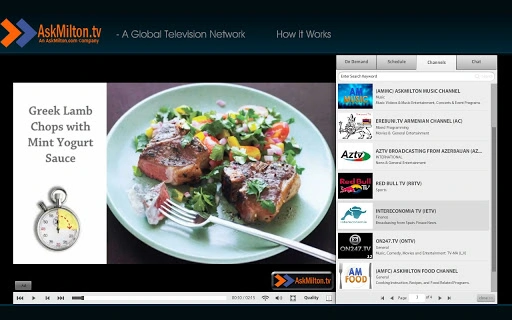
Description
Watch TV Anywhere with AskMilton.tv
AskMilton.tv is a web-based television network offering a modern alternative to traditional cable and satellite services. Designed for viewers seeking flexibility and choice, the platform delivers high-definition programming across multiple devices without subscription fees. The service enables users to watch live broadcasts or on-demand content at their convenience, supporting a multi-screen experience across TVs, computers, tablets, and mobile devices. With features such as on-screen chat, in-program search, and playback controls like pause, fast forward, and rewind, AskMilton.tv enhances viewer engagement and control. The platform is accessible through a web browser or dedicated apps for iOS devices, ensuring broad reach across operating systems. It caters to consumers who value freedom in content consumption, whether watching live or on demand. Ideal for cord-cutters and digital-first audiences, the service supports both scheduled viewing and instant access to programming. The developer did not provide additional system requirements, and exact performance details were not specified.
Key Features & Capabilities
- Multi-Screen Access: Watch live or on-demand content on TVs, computers, tablets, and mobile devices. The platform is accessible via web browser or dedicated iOS app, supporting a seamless experience across devices.
- On-Demand Viewing: Access a library of programs and movies anytime, without waiting for scheduled broadcasts. Content is available immediately, offering full control over viewing time.
- Live Broadcast Support: View scheduled programs in real time, with the ability to switch between live and on-demand content without interruption.
- In-Program Search: Use a built-in search tool to find specific shows or content within channels, improving navigation and content discovery.
- Interactive Chat: Engage with other viewers through on-screen chat during live broadcasts, enhancing the communal viewing experience.
- Playback Controls: Pause, rewind, and fast forward through programs without needing a DVR or additional hardware. This functionality supports flexible viewing habits.
- Split-Screen Mode: Watch content in full screen or split screen, allowing users to view multiple programs or content simultaneously.
- Device Compatibility: Accessible on Windows, Mac, Linux, Chrome OS, iOS, and Android systems through web or app-based interfaces.
User Interface, Workflow & Performance
The user interface of AskMilton.tv is designed around simplicity and accessibility, with a clean layout optimized for web and mobile viewing. Navigation is structured around channels, live programming, and on-demand content, allowing users to switch between viewing modes with minimal effort. The interface supports responsive design, adapting to screen size across devices. Workflow efficiency is enhanced by intuitive controls for playback, search, and chat, reducing the learning curve for new users. The platform does not require installation on most systems, as it operates primarily through web browsers. However, the developer did not specify resource usage details, and performance observations are based on general software behavior patterns. Stability during live broadcasts and on-demand playback appears consistent based on the described functionality. No reports of crashes or freezes were noted in the provided information. The platform does not require a dedicated app on all devices, though an iOS app is available for mobile access. The developer did not specify CPU or RAM behavior, so users should expect standard web-based performance levels.Compatibility & System Requirements
AskMilton.tv is compatible with a wide range of operating systems, including Windows, Mac, Linux, Chrome OS, iOS, and Android. The service is primarily web-based, meaning it runs directly in modern web browsers without requiring installation on most platforms. For iOS devices, a dedicated app is available for download, providing a more integrated experience. The installation size is listed as 0.0 MB, indicating the platform is entirely web-based with no local file storage required. The developer did not provide additional system requirements, so users should ensure their device supports modern web standards such as HTML5 and JavaScript. Compatibility with older browsers or legacy systems is not confirmed. The platform does not require specific hardware, but a stable internet connection is essential for high-definition streaming. Performance may vary based on network speed and device capabilities. Exact system requirements were not listed.Pros and Cons
Pros
- Free to use with no subscription fees
- Supports multi-screen viewing across devices
- Offers live and on-demand content with full playback control
- Includes interactive chat and search features
- Accessible via web browser or iOS app
- No need for DVR or additional hardware
- Compatible with Windows, Mac, Linux, Chrome OS, iOS, and Android
Cons
- No dedicated app available for non-iOS platforms
- Exact performance and system requirements not specified
- Limited to web-based access on most systems
- Compatibility with older devices or browsers not confirmed
- No information on content library size or update frequency
FAQ Section
Is AskMilton.tv free to use?
Yes, AskMilton.tv is completely free for viewers. There are no subscription fees or hidden charges for accessing live or on-demand content.
What devices can I use to watch AskMilton.tv?
You can watch AskMilton.tv on television sets, computers, tablets, and flash-compatible mobile phones. The service is accessible via web browser on Windows, Mac, Linux, Chrome OS, iOS, and Android devices. An iOS app is available for download.
Do I need to install software to use AskMilton.tv?
For most devices, no installation is required. The platform runs directly in a web browser. However, a dedicated iOS app is available for mobile access, which must be downloaded from the App Store.
Can I watch live TV and on-demand content?
Yes, AskMilton.tv supports both live broadcasts and on-demand programming. You can watch scheduled shows in real time or access content at your convenience.
Is the platform secure and safe to use?
As a web-based service, AskMilton.tv relies on standard browser security protocols. No personal data collection details were provided, but users should follow safe browsing practices when accessing third-party websites.
Final Thoughts + CTA
AskMilton.tv delivers a modern, flexible television experience tailored for viewers who want freedom and control over their content consumption. By combining live broadcasts with on-demand access, interactive features like chat and search, and multi-screen compatibility, the platform stands out as a viable alternative to traditional cable and satellite providers. Its free model removes financial barriers, making it accessible to a broad audience. While the lack of detailed system requirements and performance data limits in-depth evaluation, the core functionality appears robust and user-focused. The service is particularly beneficial for cord-cutters, digital nomads, and anyone seeking a lightweight, device-agnostic TV experience. With no need for DVRs or subscriptions, AskMilton.tv simplifies the viewing process. Download AskMilton.tv now.Guides & Tutorials for AskMilton.tv App for Chrome
How to install AskMilton.tv App for Chrome
- Click the Preview / Download button above.
- Once redirected, accept the terms and click Install.
- Wait for the AskMilton.tv App for Chrome download to finish on your device.
How to use AskMilton.tv App for Chrome
This software is primarily used for its core features described above. Open the app after installation to explore its capabilities.
User Reviews for AskMilton.tv App for Chrome 0
No reviews found





